
 Login / Signup
MyFBM My Lists: Streamline Repetitive Construction Orders

May 29, 2026
The Power of the Repeat: How "My Lists" Turns Complex Orders into One-Click Refills
By: Michael Alarcon
In the construction industry, the first order is often the hardest. It is the moment of maximum friction: verifying part numbers, confirming specialized pricing, and ensuring that a messy project requirement translates into a clean delivery. This is where Quick Order Entry (QOE) shines -- acting as the engine that pulls that initial complexity into the MyFBM ecosystem.
But for the professional contractor, the real challenge isn’t the first order; it’s the next ten. Whether you’re managing a multi-floor tenant improvement project or a 50-unit residential development, you aren’t just looking for materials -- you’re looking for consistency. To solve this, MyFBM designed a feature called My Lists, designed to turn your most frequent material needs into a permanent, reusable asset.
■ The "repetition" advantage
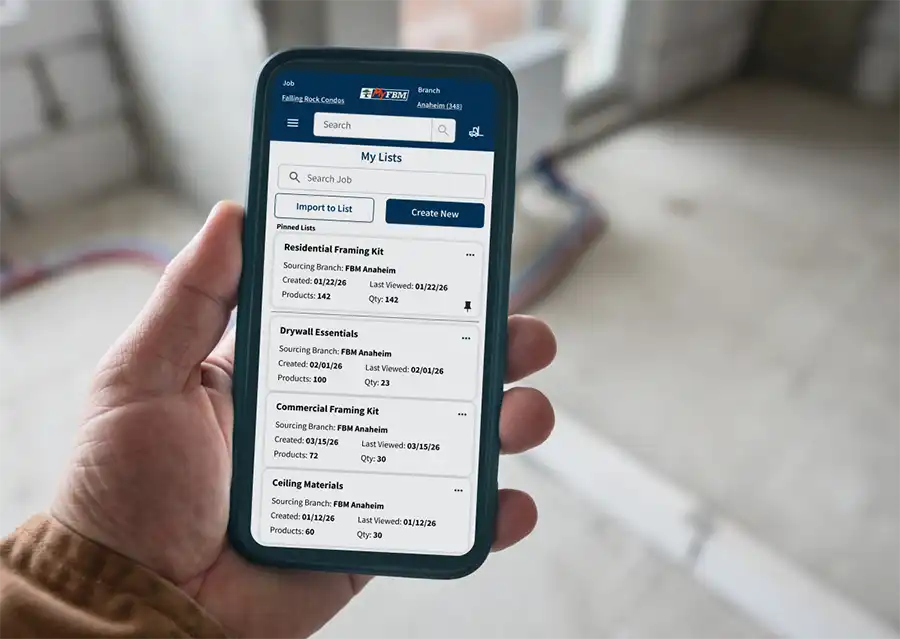
For Pros in fields like tenant improvements (TI) or residential framing, the material list rarely changes -- only the quantities do. So instead of searching for the same 5/8 in. Type X drywall or the same specialized fasteners every Tuesday afternoon, My Lists allows you to store those "essentials" in a digital vault. If QOE is the engine that gets the first order in, My Lists is the memory that makes the next ten orders effortless.
■ Built through collaboration
What makes My Lists unique isn't just that it saves time; it’s that it’s a collaborative bridge between the customer and the branch. At MyFBM, the list-building process is a team effort. While you can build your own lists as you navigate the site, you also have the backing of the FBM Digital Team to ensure accuracy. Raylee Salik, a MyFBM Digital Specialist based in Calgary, Alberta, sees the impact of this efficiency firsthand when onboarding new users. "I find a lot of customers get really excited about this," Salik says. "Whether it’s tenant improvements where it’s pretty much the same product you’re using over and over, or residential where you’re just changing your quantities, this is the perfect solution."
■ Streamlining the pro workflow
By utilizing My Lists, high-volume accounts can bypass the need for constant back-and-forth over standard pricing. The list acts as a pre-verified catalog of your most-used items, allowing you to move from a job-site material count to a confirmed order in seconds. For the modern Pro, the goal is to get back to the build as fast as possible. My Lists ensures that once you've solved the puzzle of a complex order once, you never have to solve it again.

Ready to build your first list? Connect with the FBM Digital Team to sync your most-used products today.